|
Getting your Trinity Audio player ready...
|
Quick overview
- Zigbee is the best pick for whole-home LED setups. It’s a low-power mesh network, it doesn’t clog your WiFi, and one hub can handle hundreds of bulbs.
- WiFi bulbs need no hub and pair straight from an app, but they eat more power and can slow down a crowded router.
- Bluetooth smart lights are the simplest option for a single room or a few bulbs. No hub, no router traffic, but the range and device count are limited. If you’re building a smart home from scratch, Zigbee wins on scale. If you just want 2 or 3 bulbs working tonight, Bluetooth or WiFi will get you there faster.
Picking a wireless protocol for LED lighting isn’t just a spec sheet exercise. It decides how fast your lights respond, how much your electric bill creeps up, and whether your whole setup falls over when 15 more devices join the network.
This guide breaks down Zigbee, WiFi, and Bluetooth LED lighting in plain English, backed by real numbers, so you can pick the right one the first time. Also, fundamental led guid is worth consulting for basic understanding.
What’s the Real Difference Between Zigbee, WiFi, and Bluetooth LED Lights?
Zigbee, WiFi, and Bluetooth are all radio protocols that run on the 2.4 GHz band, but they were built for different jobs. Zigbee was designed for small, constant data bursts across a mesh network. WiFi was built for high-bandwidth internet traffic. Bluetooth was built for short-range, device-to-device pairing.
That difference in original purpose is why they behave so differently once you screw a smart bulb into a socket.
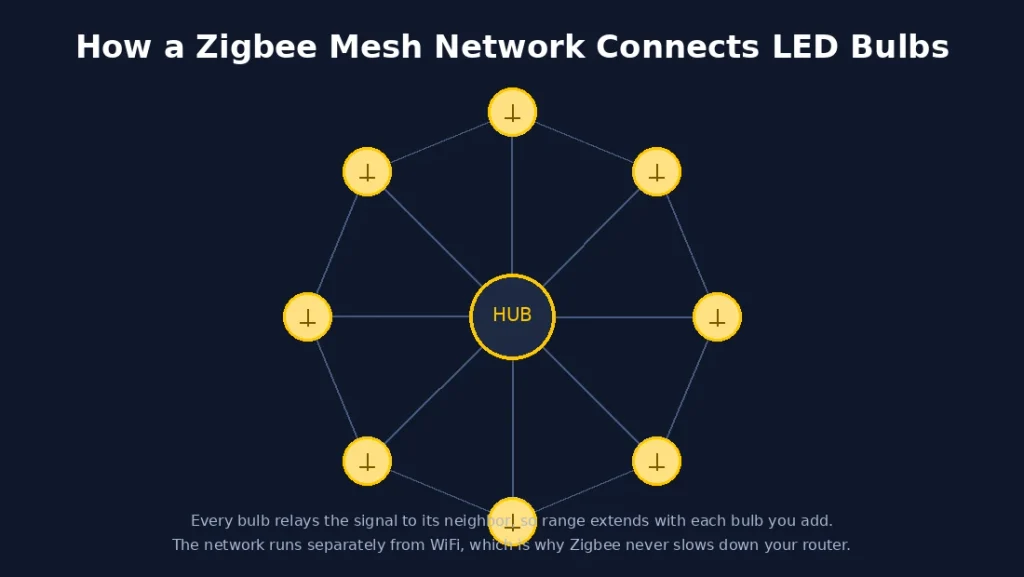
Zigbee needs a hub (like a Philips Hue Bridge or a SmartThings hub) and creates its own mesh network, separate from your WiFi. Each bulb also acts as a signal repeater for the next one.
WiFi bulbs connect straight to your router. No extra hub required, but every bulb is now a device competing for bandwidth on your home network.
Bluetooth bulbs pair directly with your phone over short range. Newer models use Bluetooth mesh, so bulbs can relay signals to each other, similar to Zigbee, but with a smaller practical range.
How Does Zigbee Compare to WiFi for Smart Lighting?
Zigbee wins on power efficiency and network stability. WiFi wins on setup simplicity and voice assistant compatibility out of the box.
In a zigbee vs wifi comparison for lighting specifically, the gap comes down to how each protocol handles dozens of small, frequent commands (turn on, dim to 40%, change color) instead of one big data stream.
| Factor | Zigbee | WiFi |
|---|---|---|
| Needs a hub | Yes | No |
| Typical range per hop | 10 to 100 meters | Up to 50 meters indoors |
| Data rate | 250 kbps | Up to 600 Mbps (802.11n) |
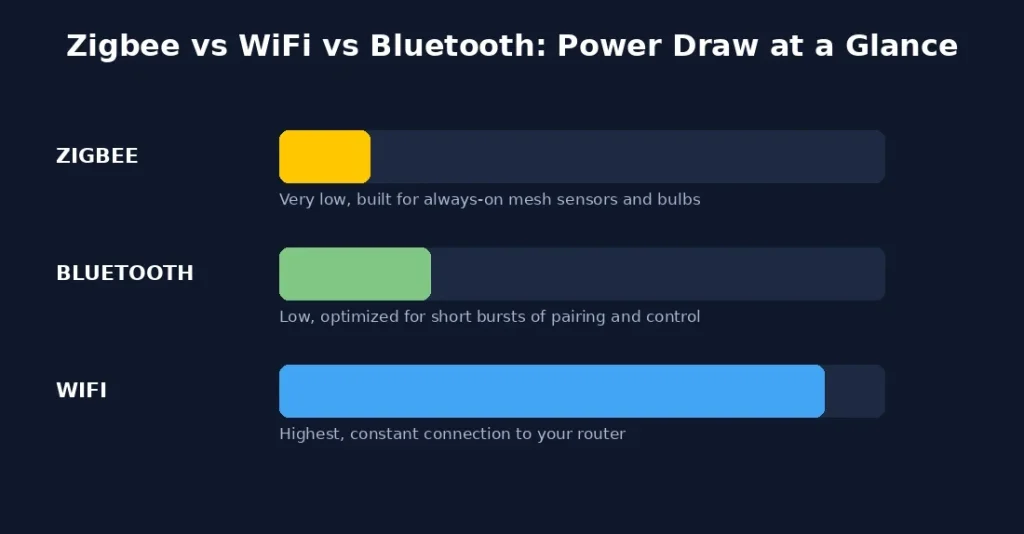
| Power draw | Very low | Higher, constant router connection |
| Devices per network | Up to 65,000 (mesh) | Limited by router capacity |
| Impact on home WiFi | None, separate network | Adds to router load |
Zigbee’s 250 kbps data rate sounds tiny next to WiFi’s hundreds of megabits, but light bulbs don’t need to stream video. They need a fast “on” command and nothing else, which is exactly what Zigbee was optimized for.
WiFi still makes sense if you only own 3 or 4 bulbs and don’t want to buy a separate hub. Past that, most routers start to choke.
Zigbee vs Bluetooth: Which One Should You Pick for a Few Bulbs?
For a single room with 2 to 6 bulbs, Bluetooth is often the simpler choice. For anything bigger, Zigbee scales better without slowing down.
A zigbee vs bluetooth decision usually comes down to one question: are you lighting one room or an entire house?
Bluetooth smart bulbs pair directly with your phone. Open the app, tap connect, done. No bridge, no separate app-within-an-app setup. That’s a real advantage for a bedroom lamp or a single strip light behind the TV.
Zigbee needs an initial hub setup, which takes 10 to 15 minutes the first time. After that, every new bulb joins the mesh automatically and strengthens the network instead of straining it.
Bluetooth’s practical range tops out around 30 to 40 meters through walls, and older Bluetooth (non-mesh) devices can only be controlled one at a time from close range. Zigbee’s mesh keeps working reliably at whole-house scale because every bulb relays the signal to its neighbor.
Bluetooth Smart Light: When Does It Actually Make Sense?
A bluetooth smart light setup makes the most sense when you want zero hub cost, zero router impact, and you’re only lighting a small space.
Think dorm rooms, rentals, RVs, or a single accent light. You don’t want to buy a $60 hub for 2 bulbs, and Bluetooth doesn’t ask you to.
The catch: most single-bulb Bluetooth lights lose their app connection once you’re a room or two away, and older models can’t talk to Alexa or Google Home without an extra bridge accessory. If voice control matters to you, check the box says “Bluetooth mesh” or “works with Alexa” before buying.
What Are Smart Home Protocols and Why Do They Matter for LED Lights?
Smart home protocols are the wireless languages that let your devices talk to a hub, an app, or each other. The protocol you pick affects everything downstream: response speed, battery life on sensors, and how many devices you can realistically run.
Beyond Zigbee, WiFi, and Bluetooth, you’ll also run into Z-Wave and Thread in the wider smart home world. Z-Wave runs on a different frequency (around 900 MHz in the US) and is common in security devices. Thread is newer and forms the backbone of Matter, the industry’s push toward one universal standard backed by Apple, Google, Amazon, and Samsung.
For pure LED lighting though, the real contest is still between the 3 covered in this guide.
WiFi Bulbs vs Zigbee: Which Wins for a Whole-House Setup?
For a whole-house install with 20+ bulbs, Zigbee wins on reliability. A wifi bulbs vs zigbee router-load test makes the reason obvious.
Every WiFi bulb takes up a connection slot on your router, the same as a laptop or a smart TV. Most consumer routers handle 30 to 50 connected devices comfortably before performance drops. Add smart plugs, cameras, and 2 laptops, and 20 WiFi bulbs can genuinely tip a home network into lag.
Zigbee bulbs don’t touch your router at all. They talk to each other and to the hub on their own mesh, so your WiFi stays free for actual internet use. That’s also why battery-powered Zigbee sensors last 2 to 3 years, versus 3 to 6 months for a comparable WiFi sensor. Bulbs are usually hardwired, so this specific point matters more for switches and sensors in the same ecosystem, but it says a lot about how much less power Zigbee radios draw.
Zigbee vs WiFi vs Bluetooth LED Light: Full Comparison Table
Here’s the complete zigbee vs wifi vs bluetooth led light breakdown in one place.
| Factor | Zigbee | WiFi | Bluetooth |
|---|---|---|---|
| Hub required | Yes | No | No (mesh models optional) |
| Best for | Whole-home setups | Small setups, quick install | Single room, 1 to 6 bulbs |
| Setup time | 10 to 15 min (hub) then instant per bulb | 2 to 5 min per bulb | 1 to 2 min per bulb |
| Max practical range | 100m per hop, mesh extends further | ~50m indoors | ~30-40m |
| Router load | None | Direct load on router | None |
| Voice assistant support | Excellent, via hub | Excellent, native | Good on newer mesh models only |
| Power efficiency | Very high | Moderate to low | High |
| Typical cost | Slightly higher (hub + bulbs) | Lowest entry cost | Low entry cost |
Which Protocol Should You Choose Based on Your Home Size?
Small apartment or single room (1 to 6 bulbs)
Bluetooth or WiFi both work fine here. Skip the hub. Go with whichever app you find easiest to use, since range and device limits won’t be an issue at this scale.
Mid-size home (7 to 20 bulbs)
This is where WiFi starts to strain and Zigbee starts to pay off. If you already own a Zigbee hub for other devices (like a Hue bridge or a SmartThings hub), add your bulbs to that mesh.
Whole house or heavy automation (20+ bulbs, multiple rooms)
Zigbee is the clear answer. The mesh network, low power draw, and zero router impact make it the only protocol on this list built for that scale.
Does Matter Change the Zigbee vs WiFi vs Bluetooth Debate?
Matter, the universal smart home standard backed by the Connectivity Standards Alliance (formerly the Zigbee Alliance), is starting to blur these lines. Matter itself isn’t a radio protocol. It’s an application layer that runs on top of Thread or WiFi, and it lets devices from different brands work together without separate apps.
Zigbee devices aren’t natively Matter-compatible, but bridges are rolling out to connect existing Zigbee mesh networks into a Matter ecosystem. For now, if you’re buying new, look for the Matter logo on the box. It’s a sign the bulb will play nicely with whatever ecosystem you end up building next.
Which Protocol Is Most Secure for Smart Lighting?
All 3 protocols use real encryption today, but Zigbee has the edge for dedicated smart home traffic.
Zigbee networks run on 128-bit AES encryption at the protocol level, and because the mesh is separate from your main WiFi, a compromised bulb can’t act as a backdoor into your laptop or router. WiFi bulbs rely on your router’s WPA2 or WPA3 security, which is solid, but it also means every bulb sits on the same network as your banking app and work files. Bluetooth pairing is short-range by nature, which limits how far an attacker needs to be, though older, non-mesh Bluetooth devices have historically had weaker default security than the other two.
None of this means WiFi or Bluetooth bulbs are unsafe. It just means Zigbee’s separate mesh gives you one extra layer between a cheap bulb and the rest of your home network.
Conclusion: So Which One Should You Actually Buy?
If you’re lighting a whole house, go Zigbee. The mesh network, the low power draw, and the fact it never touches your router make it the protocol that scales without falling apart.
If you’re lighting a single room and don’t want to think about hubs, grab a WiFi or Bluetooth bulb and move on with your day. Both will work for a handful of bulbs.
The mistake most people make is buying 15 WiFi bulbs because the first 2 were easy to set up. Start with your final device count in mind, not just tonight’s setup.
FAQs
Is Zigbee better than WiFi for smart bulbs?
For more than 10 to 15 bulbs, yes. Zigbee uses less power, doesn’t load your router, and scales through mesh networking. For 2 or 3 bulbs, WiFi is simpler since it skips the hub.
Do Zigbee LED lights need a separate hub?
Yes. Zigbee bulbs need a compatible hub, such as a Philips Hue Bridge, SmartThings hub, or Amazon Echo with a built-in hub, to connect to your phone and voice assistants.
Can Bluetooth smart lights work without WiFi?
Yes. Bluetooth bulbs pair directly with your phone over short range and don’t need an internet connection to turn on or change color. You’ll need WiFi only if you want to control them remotely, away from home.
Do WiFi bulbs slow down my internet?
A handful won’t make a noticeable difference. But 15 or more WiFi bulbs, on top of your other connected devices, can strain an average home router and cause lag or dropped connections.
Is Zigbee or Bluetooth more energy efficient for LED lights?
Zigbee is generally more energy efficient over a full mesh network, since it was purpose-built for low-power, low-data devices. Bluetooth is close behind and is still far more efficient than WiFi.