|
Getting your Trinity Audio player ready...
|
Flickering LED lights can be caused by a faulty bulb, LED driver, incompatible dimmer, loose connection, overheating, or another electrical issue. The right fix depends on when the flickering occurs, immediately after switching on, only while dimming, after the light heats up, or continuously.
Unlike traditional incandescent bulbs, LEDs rely on electronic components to regulate power. A problem with the bulb, driver, fixture, dimmer, or electrical connection can therefore affect how steadily the light operates.
Quick Overview
Flickering LED lights can result from a faulty bulb, driver, dimmer, loose connection, overheating, or an electrical issue. Identify when the flickering occurs before choosing a fix.
- Test the LED bulb with a known-good replacement.
- Check the LED driver and fixture compatibility.
- Inspect the dimmer if the light flickers while dimming.
- Check for overheating or unsuitable fixture conditions.
- Look for loose connections or electrical warning signs.
- Call a qualified electrician for suspected wiring or electrical faults.
Why Are My LED Lights Flickering?
LED flickering does not automatically mean the bulb is defective. Several parts of the lighting system can cause unstable light output.
Common causes include:
- Faulty or incompatible LED bulb
- Failing LED driver
- Incompatible dimmer
- Loose or damaged electrical connection
- Excessive heat
- Unsuitable fixture
- Different LED bulbs used on the same circuit
- Electrical problems affecting the power supply
Start by identifying when the flickering happens. This can narrow down the likely cause before you replace anything.
| Flickering pattern | What to check first |
|---|---|
| One LED flickers | Bulb or LED driver |
| Several LEDs flicker | Dimmer, fixture, wiring, or power supply |
| Only flickers while dimming | LED and dimmer compatibility |
| Starts immediately after switching on | Bulb, driver, or switching equipment |
| Starts after running for a while | Heat and fixture conditions |
| Flickers with buzzing | Bulb, driver, dimmer, or compatibility |
| Different bulbs behave differently | Driver and compatibility differences |
Is the LED Bulb or Driver Causing the Flicker?
The LED driver regulates the electrical power supplied to the LED. If the driver is failing or receiving electrical conditions it was not designed to handle, the light output can become unstable.
A simple way to narrow down the problem is to test the suspected bulb in another compatible fixture or temporarily install a known-good compatible LED in the original fixture.
If the problem follows the bulb, the bulb or its internal driver may be faulty. If the replacement also flickers in the same fixture, investigate the fixture, dimmer, connections, or electrical supply.
Can a Dimmer Cause LED Lights to Flicker?
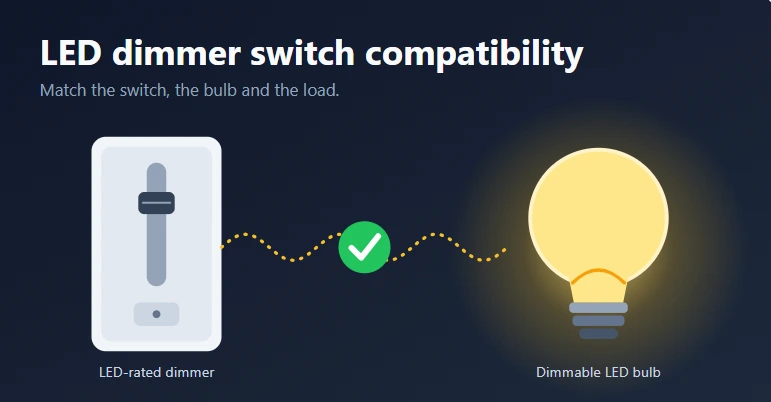
Yes. A dimmer can cause flickering when it is incompatible with the LED bulb or its driver.
Older dimmers were often designed around incandescent or halogen loads. LEDs use electronic drivers and typically draw much less power, so an older dimmer may not operate them correctly.
Check these points:
- Is the LED specifically labeled dimmable?
- Is the dimmer rated for LED loads?
- Does the dimmer support the required dimming method?
- Does the connected load fall within the dimmer’s specified range?
For detailed dimmer-related troubleshooting, see Why Dimmable LED Lights Flicker and How to Fix Them.
What Is Phase-Cut Dimming?
Many wall dimmers control LED brightness by changing part of the AC waveform. This is called phase-cut dimming.
The two common types are:
- Leading-edge dimming: cuts the beginning of each AC waveform cycle.
- Trailing-edge or reverse-phase dimming: cuts the end of each cycle.
The correct method depends on the LED driver and dimmer combination. If they are mismatched, you may experience flickering, buzzing, poor dimming, or unstable operation.
If the LED works normally without the dimmer but flickers when dimmed, investigate compatibility between the dimmer and LED rather than immediately replacing the bulb.
Can Low Electrical Load Cause LED Flickering?
If your LED is connected to a dimmer, the dimmer’s minimum load requirement can affect performance.
For example, replacing several 60W incandescent bulbs with low-wattage LEDs can dramatically reduce the total electrical load. If the connected LED load falls outside the dimmer’s specified range, the lights may flicker, fail to turn on properly, or become unstable.
Check the dimmer’s minimum and maximum LED load ratings, not just its maximum wattage.
If there is no dimmer installed, minimum-load compatibility is generally not the first issue to investigate.
Why Are My LED Lights Buzzing?
Flickering can sometimes occur alongside buzzing or humming.
Possible sources include:
- LED bulb components
- Internal LED driver
- Dimmer
- Fixture
- Incompatible electrical equipment
If a dimmer is installed, check compatibility first. You can also test a known-good compatible LED to see whether the noise disappears.
Persistent buzzing deserves more attention when it occurs with excessive heat, burning smells, visible damage, or other unusual electrical behavior.
Could Loose Wiring Cause an LED to Flicker?
Yes. A loose or damaged electrical connection can cause intermittent flickering.
This becomes more important when:
- The light flickers even at full brightness.
- Several lights are affected.
- The flickering is unrelated to dimming.
- The problem changes when other electrical loads operate.
- The issue occurs unpredictably.
Do not attempt to repair mains wiring unless you are qualified to do so. If you suspect a loose connection or electrical fault, have the installation checked by a qualified electrician.
Can Heat Make LED Lights Flicker?
Excessive heat can affect the reliability of LED electronics and may shorten component life.
Check whether the LED is suitable for the fixture, particularly if it is installed inside an enclosed housing. Some LED bulbs are specifically rated for enclosed fixtures, while others are not.
If an LED repeatedly becomes unusually hot, flickers after operating for some time, or fails prematurely, investigate the fixture and installation conditions instead of repeatedly replacing bulbs.
Can Mixing Different LED Bulbs Cause Flickering?
Different LED bulbs can use different driver designs and may not respond identically to the same electrical conditions.
This can be more noticeable when a dimmer is involved.
You might see:
- One bulb flickering while another remains stable
- Uneven brightness
- Different dimming behavior
- Different buzzing levels
Using compatible bulbs of the same model can make troubleshooting easier and provide more consistent performance.
How to Fix Flickering LED Lights
Work through these checks in order rather than replacing multiple components at once. Check a detailed guide on the led light lifespan for indepth knowledge.
1. Check the LED Bulb
Confirm that the bulb is suitable for the fixture. If possible, replace it temporarily with a known-good compatible LED.
If the replacement works normally, the original bulb or its driver may be the source of the problem.
2. Check for a Dimmer
If a dimmer is installed, confirm that both the LED and dimmer are compatible.
If the flickering occurs only while changing brightness, focus on the dimmer, LED driver, dimming method, and load requirements.
3. Check the Fixture
Make sure the LED is suitable for the fixture and operating conditions.
For enclosed fixtures, verify that the bulb is rated for enclosed use. Also check whether excessive heat could be affecting the LED.
4. Test Whether the Problem Follows the Bulb
If the bulb can safely be tested in another compatible fixture, see whether the flickering follows it.
- Flicker follows the bulb: the bulb or internal driver may be faulty.
- Flicker stays with the fixture: investigate the fixture, dimmer, wiring, or power supply.
This simple comparison can prevent unnecessary replacement of working components.
5. Check for Electrical Warning Signs
Look for symptoms such as:
- Burning smells
- Scorch marks
- Sparks
- Excessive heat
- Damaged switches or fixtures
- Repeated breaker trips
- Multiple lights flickering unexpectedly
These signs can indicate an electrical fault rather than a simple LED problem.
LED Flickering Troubleshooting Checklist
| What you notice | What to check |
|---|---|
| One LED flickers | Bulb and LED driver |
| Several LEDs flicker | Fixture, dimmer, wiring, or power supply |
| Flickers only when dimming | LED/dimmer compatibility |
| Flickers immediately after switching on | Bulb, driver, or switching equipment |
| Flickers after running for a while | Heat and fixture conditions |
| Flickers with buzzing | Bulb, driver, dimmer, or compatibility |
| Different bulbs behave differently | Driver differences and compatibility |
| Flickering with heat or burning smell | Stop using it and seek professional inspection |
What About LED Inrush Current?
LED drivers can draw a brief inrush current when power is first applied. The amount varies according to the driver design and the number of connected fixtures.
This can matter when several LED lights share the same switching or dimming equipment. When assessing compatibility, consider the equipment’s electrical ratings and the characteristics of the connected LED drivers, not only the LEDs’ normal running wattage.
Repeated switch or dimmer failures should be professionally investigated rather than treated as a simple bulb problem.
When Should You Replace the LED Bulb?
Consider replacing the bulb when:
- It is visibly damaged.
- It flickers in multiple compatible fixtures.
- A known-good replacement works normally in the same fixture.
- The manufacturer identifies a fault.
- The bulb is not suitable for the fixture.
Before replacing it, make sure the problem is not actually coming from the dimmer, fixture, wiring, or electrical supply.
When Should You Call an Electrician?
Some flickering problems are caused by simple product incompatibility. Others can indicate a potentially unsafe electrical condition.
Have a qualified electrician inspect the installation if you notice:
- Burning smells
- Sparks
- Scorch marks
- Hot or damaged wiring
- Repeated breaker trips
- Multiple lights flickering unexpectedly
- A damaged switch or fixture
- Unexplained electrical behavior
- Uncertainty about the wiring
Do not remove or modify mains wiring simply to diagnose a flickering LED.
Final Takeaway
Flickering LED lights can originate from the bulb, driver, fixture, dimmer, heat conditions, wiring, or electrical supply. Start with the simplest checks: test the bulb, confirm fixture compatibility, and check the dimmer if one is installed.
If multiple lights flicker or the problem comes with heat, burning smells, sparks, damaged wiring, or repeated breaker trips, stop troubleshooting the bulb and have the electrical installation inspected by a qualified electrician.
FAQs
Why do my LED lights flicker?
LED lights can flicker because of a faulty bulb or driver, dimmer incompatibility, loose connections, overheating, or other electrical problems. The timing and pattern of the flickering can help identify the likely cause.
Why do my LED lights flicker without a dimmer?
Without a dimmer, check the LED bulb, driver, fixture, heat conditions, electrical connections, and power supply. If several lights flicker at the same time, professional electrical inspection may be necessary.
Can a bad LED bulb cause flickering?
Yes. A faulty LED or internal driver can cause flickering. Testing a known-good compatible bulb can help determine whether the problem follows the bulb or remains with the fixture.